
When most organizations evaluate their cybersecurity posture, the protocol is straightforward and familiar. The IT team deploys multi-factor authentication across every corporate email account, enforces strict laptop endpoint management, and locks down the central firewall.
Meanwhile, sitting in the hallway near the break room is a multi-function copier connected directly to the corporate network—running factory-default administrator credentials and firmware last updated in 2019.
It is easy to view a modern office copier as a passive appliance, much like a stapler or a coffee machine. In reality, modern multi-function printers (MFPs) are fully functional, specialized computers equipped with hard drives, operating systems, print servers, and network interfaces. If left unmonitored, an unsecured printer becomes an unmonitored gateway straight into your internal network.
Here is why your office printing fleet represents a critical security endpoint—and three actionable steps your team can take today to secure it.
The Hidden Risks Inside Your Office Copier
Modern copiers do far more than transfer ink to paper. Every time a contract is printed, a tax form is scanned, or an invoice is emailed, the device processes and temporarily stores that data. Without proper security controls, several vulnerabilities emerge:
1. Cached Data on Unencrypted Hard Drives
Digital copiers store digital image files of processed documents on internal hard drives. If those drives lack automatic job overwrite or encryption features, confidential HR records, financial statements, and client information remain permanently stored on the machine. If an end-of-lease copier is returned without a proper hard drive wipe, that data leaves your building with it.
2. Default Factory Credentials
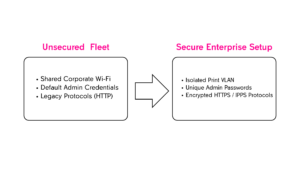
Most copier manufacturers ship devices with standard administrator passwords—such as, or, or. These credentials are easy to find online. If an employee or guest on your network accesses the printer’s Web User Interface (Web UI) using these default settings, they can alter network routing settings, access stored scan logs, or redirect incoming faxes.
3. Open Network Protocols
To ensure easy setup out of the box, many copiers ship with legacy network protocols enabled by default. Legacy protocols like Telnet or unencrypted HTTP transmit data across the local network in plain text, making print jobs vulnerable to packet sniffing or intercept on unsegmented office networks.
3 Quick Fixes to Secure Your Fleet This Week
Securing your print infrastructure does not require replacing your entire fleet. Most enterprise-grade copiers already contain built-in security features that simply need to be enabled and managed correctly.
Step 1: Change All Default Administrator Credentials
Immediately access the web management portal for every multi-function printer on your network and change the factory admin password. Enforce a strong, unique password policy for all print management accounts, and restrict admin access exclusively to authorized IT personnel.
Step 2: Segment Your Printers onto an Isolated VLAN
Printers rarely need to communicate directly with core financial database servers or executive workstations. Move all networked printing hardware onto a dedicated, isolated Virtual Local Area Network (VLAN). By walling off print traffic, you ensure that even if a printing endpoint is compromised, the attacker cannot easily pivot to access primary corporate data repositories.
Step 3: Enforce Secure Protocols and Disable Unused Ports
Review your printer’s active service settings and disable unnecessary listening protocols (such as FTP, Telnet, or AppleTalk). Mandate encrypted printing pathways like IPPS (Internet Printing Protocol Secure) or HTTPS for web configuration management, ensuring that all data sent between user workstations and the print controller remains encrypted in transit.
Balancing Hardware Reliability with Operational Risk
Security compliance is not just a software issue—it extends directly to hardware procurement, maintenance, and fleet management. Ensuring your devices run verified firmware, utilizing hard drive overwrite kits, and keeping high-wear consumable components (such as drums and fusers) functioning smoothly prevents emergency downtime that leads to risky workarounds.
Since 1973, Copier Supply Store has supplied business and government procurement teams with the OEM and aftermarket consumables, maintenance kits, and replacement parts necessary to keep document workflows running reliably and securely.
Need Hardware or Fleet Support?
Whether you are auditing your current printing fleet, sourcing hard drive overwrite accessories, or restocking high-yield supplies for your enterprise hardware, our national distribution network delivers the exact parts you need with fast 1- to 2-day ground shipping coverage.